
7. AI Integration (MCP)
PinSlip includes a built-in MCP server (Model Context Protocol, the open standard).
Your AI assistant (Claude Code / Kimi Work / any MCP-compatible client) can search, read, write, and delete your notes.
Enabled by default, listening on a fixed port on 127.0.0.1.
7.1 What MCP Is
MCP (Model Context Protocol) is an open protocol from Anthropic that lets AI assistants call local tools. PinSlip's MCP server exposes 12 tools covering read, write, and sync.
Lifecycle
Lives and dies with the PinSlip app — if PinSlip isn't running, MCP isn't available.
Listens on a fixed port on 127.0.0.1 (loopback only — unreachable from external networks).
Protocol: Streamable HTTP (the MCP standard).
Master Switch
Settings → MCP Service
On by default.
When disabled, the server's
/mcpendpoint returns 404.
7.2 Connection Discovery
On launch, PinSlip writes discovery info to <vault>/.pinslip/mcp.json:
{
  "port": 17639,
  "pid": 12345,
  "version": "1.0.1",
  "mcpPath": "/mcp",
  "startedAt": "2026-07-31T14:00:00+08:00"
}
How does a client know how to connect? Just read this file (PnP AI assistants must be able to read it).
If the
pidis dead → PinSlip prompts you to "launch PinSlip".The settings drawer has a one-click "copy connection info" button that puts the mcpServers JSON on your clipboard.
7.3 Client Configuration Examples
Claude Code
{
  "mcpServers": {
    "pinslip": {
      "url": "http://127.0.0.1:17639/mcp",
      "type": "http"
    }
  }
}
Replace <port> with the actual port from your mcp.json.
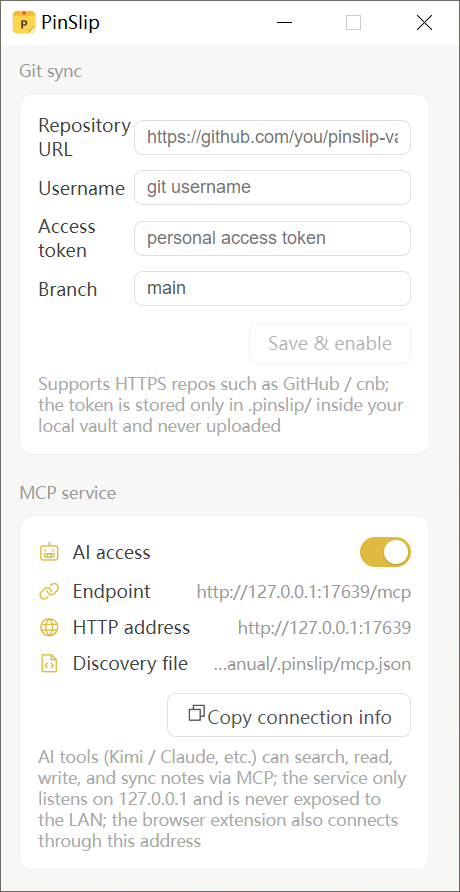
Copy Connection Info
Settings → MCP Service → Copy connection info → paste directly into the client config.
7.4 The 12 Tools
Data Plane (10 tools)
Tool | Purpose | Key parameters |
|---|---|---|
| Full-text search |
|
| List notes (with summaries) |
|
| Read a complete note |
|
| Create a note |
|
| Full replacement |
|
| Inline replacement |
|
| Append |
|
| Delete (moves to recycle bin only) |
|
| List all tags + counts | — |
| List all folders | — |
Sync Plane (2 tools)
Tool | Purpose |
|---|---|
| Trigger an immediate commit + pull + push |
| Query |
Time Filtering
search_notes / list_notes support:
since/until: a closed interval.Accepts
YYYY-MM-DD(local timezone) or full RFC 3339.timeField=updated(default) /created.
7.5 What AI Can and Can't Do
✅ AI Can
Search any note (full-text + tag + folder + time)
Read the full content of any note
Create notes (with specified folder and tags)
Modify notes (full replacement / inline replacement / append)
Delete notes (still goes through the recycle bin — never bypasses it)
Trigger sync and query sync status
❌ AI Cannot
UI state: pin, color, collapse, group membership
Sync configuration: repo URL, token, branch
Hard delete: bypass the recycle bin to delete permanently
Modify files outside the vault (only scans the vault directory)
7.6 Typical Workflows
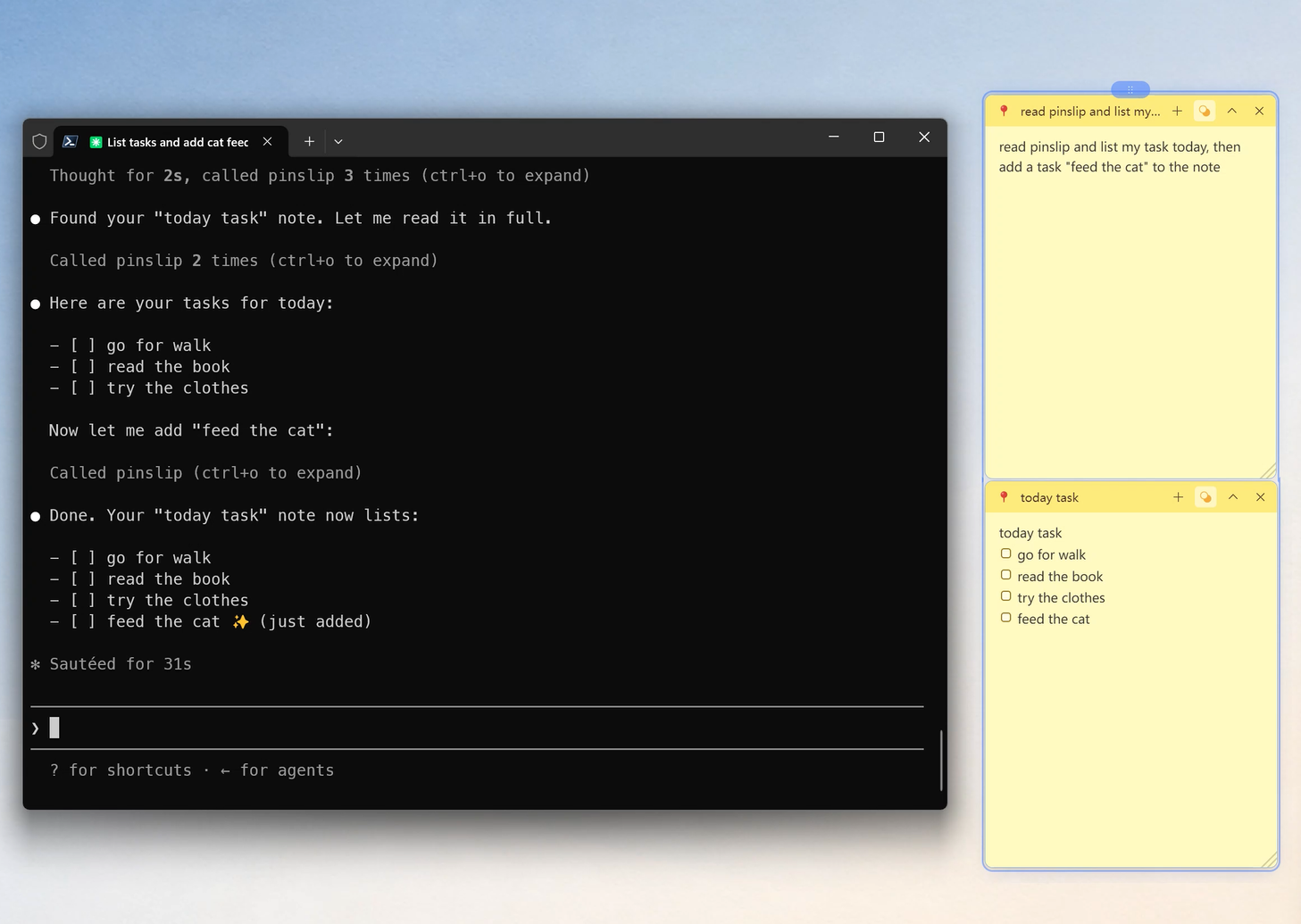
Let AI Write Your Daily Report
You: What did I do today? Help me write a daily report.

AI plan:
1. list_notes(since: 2026-07-31)
2. read_note on candidate notes
3. Summarize
4. create_note(folder="daily-reports", title="Daily Report 2026-07-31", content=summary)
Let AI Tidy Up inbox
You: Sort today's notes from inbox into the matching folders by topic.

AI plan:
1. list_notes(folder="inbox")
2. read_note each one
3. Classify and pick a target folder
4. update_note(folder=target)
Let AI Find a Forgotten Idea
You: I wrote down something about "backend performance optimization" — find it for me.

AI plan:
1. search_notes("backend performance optimization")
2. read_note matching items
Let AI Audit Your Task List
You: Which tasks didn't I finish today?

AI plan:
1. search_notes "- [ ]" or read all notes and grep
2. List the unfinished ones
Let AI Bulk-Edit Tags
You: Add a #2026Q3 tag to every note tagged #work.

AI plan:
1. list_notes(tag="work")
2. Per note, update_note / patch_note to add the tag
7.7 Security Notes
MCP only listens on 127.0.0.1: external networks can't reach it — only local agent clients can connect.
No token authentication: loopback binding is the authentication (enforced by the OS).
App exit → server stops: no long-term exposure.
Deletes go to the recycle bin: recoverable from mistakes.
Recommendation: turn the MCP switch off on public computers or shared accounts.
7.8 Troubleshooting
Symptom | What to check |
|---|---|
Client connection errors | Check whether the port in |
Tool call returns 404 | Check whether the MCP Service switch is on in Settings |
Tool call auth failure | Confirm the |
Tool call timeout | Go service is stuck → restart PinSlip |