
I like cloud services.
They make it easy to sync data between devices, collaborate with other people, and avoid the hassle of manually moving files around.
I use plenty of cloud-based tools myself.
But while building PinSlip, I kept coming back to one question:
Why should writing a simple sticky note depend on an online service?
Sometimes I just want to write down a task, capture a quick idea, or save a few lines of code I'll need later.
Wouldn't it make sense for that information to live on my own computer first?
I want to be able to open my notes, edit them, and keep working even when I'm offline.
And if I ever stop using a particular note-taking app, I want my notes to remain accessible without having to figure out how to export them from a proprietary system.
That's one of the reasons I chose to build PinSlip as a local-first desktop sticky notes app.
I don't think every note-taking application needs to work this way. But for the kind of desktop notes I use every day, local-first feels like a natural fit.
What Does Local-First Actually Mean?
Local-first doesn't mean rejecting the cloud.
It doesn't mean your data must stay on one computer forever, either.
The basic idea is that software should be able to work with local data first, while synchronization and online services provide additional capabilities.
In a local-first note-taking application, that might mean:
You can create and edit notes without an internet connection.
Core features don't need to wait for a server response.
Your notes remain accessible even when a cloud service is unavailable.
You can choose how to synchronize your data between devices.
The idea isn't new.
In 2019, the Ink & Switch research group published an essay called Local-first software: You own your data, in spite of the cloud.
It explored how software could combine the advantages of local applications, including user control and offline availability, with the benefits of modern cloud collaboration.
One idea from that work particularly resonates with me:
Users shouldn't have to give up control over their data just to enjoy the convenience of modern software.
Of course, the broader local-first vision includes more than offline access and local storage. It also explores synchronization, collaboration, conflict resolution, and long-term availability.
PinSlip doesn't implement every part of that vision.
It's a small desktop sticky notes app, not a fully collaborative document platform.
But local-first principles have influenced several important decisions about how I build it.
1. My Notes Shouldn't Depend on an Account
A lot of software asks you to create an account before you can use it.
That isn't necessarily a bad thing.
Accounts make features like cross-device synchronization, personalized settings, and online collaboration possible.
But for something as simple as a desktop sticky note, I'd rather let people open the app and start writing.
No email address required.
No account verification.
No need to upload notes to a service just to create them.
Writing a sticky note shouldn't require a setup process.
In PinSlip, you can create a note immediately.
Your notes are stored in a local folder you choose. You don't need a PinSlip account or an internet connection to use the core note-taking features.
I think this simplicity matters, especially for small desktop utilities.
When an idea comes to mind, I don't want to think about login sessions, network connectivity, or whether a service is available.
I just want to write it down.
Of course, not requiring an account doesn't automatically make an application local-first.
What matters more is whether your data and the essential features of the application remain useful without depending on that account or service.
2. Offline Should Be the Default, Not a Special Feature
Imagine you're writing code.
You need to open a sticky note containing a few commands you saved earlier.
Does that really require an internet connection?
I don't think so.
For a desktop notes application, creating, opening, and editing local content should be basic functionality.
If my Wi-Fi disconnects, I should still be able to write.
If a synchronization service is temporarily unavailable, I should still be able to read my existing notes.
This doesn't mean local software is always faster than cloud software.
Modern web applications can offer excellent performance and offline capabilities too.
But when core operations don't depend on remote requests, network availability becomes less important to the everyday experience.
That's why PinSlip's essential note-taking functionality works locally.
When you open a note, you're accessing content stored on your computer.
When you edit it, you can continue working without waiting for a remote service to confirm every change.
For a small tool that might be opened dozens of times throughout the day, that predictable experience matters.
3. I Prefer Files I Can Actually Open
This is probably the most important design decision I made for PinSlip.
I want my notes to be ordinary files, not just records hidden inside an application's database.
Imagine using a note-taking app for several years.
Over time, you collect hundreds of notes.
Then one day, you decide to move to a different application.
If your notes are stored in a proprietary format, you might need to find an export feature, convert files, or deal with formatting differences.
You may even discover that some information doesn't survive the migration perfectly.
But what if your notes were ordinary Markdown files from the beginning?
You could just open them.
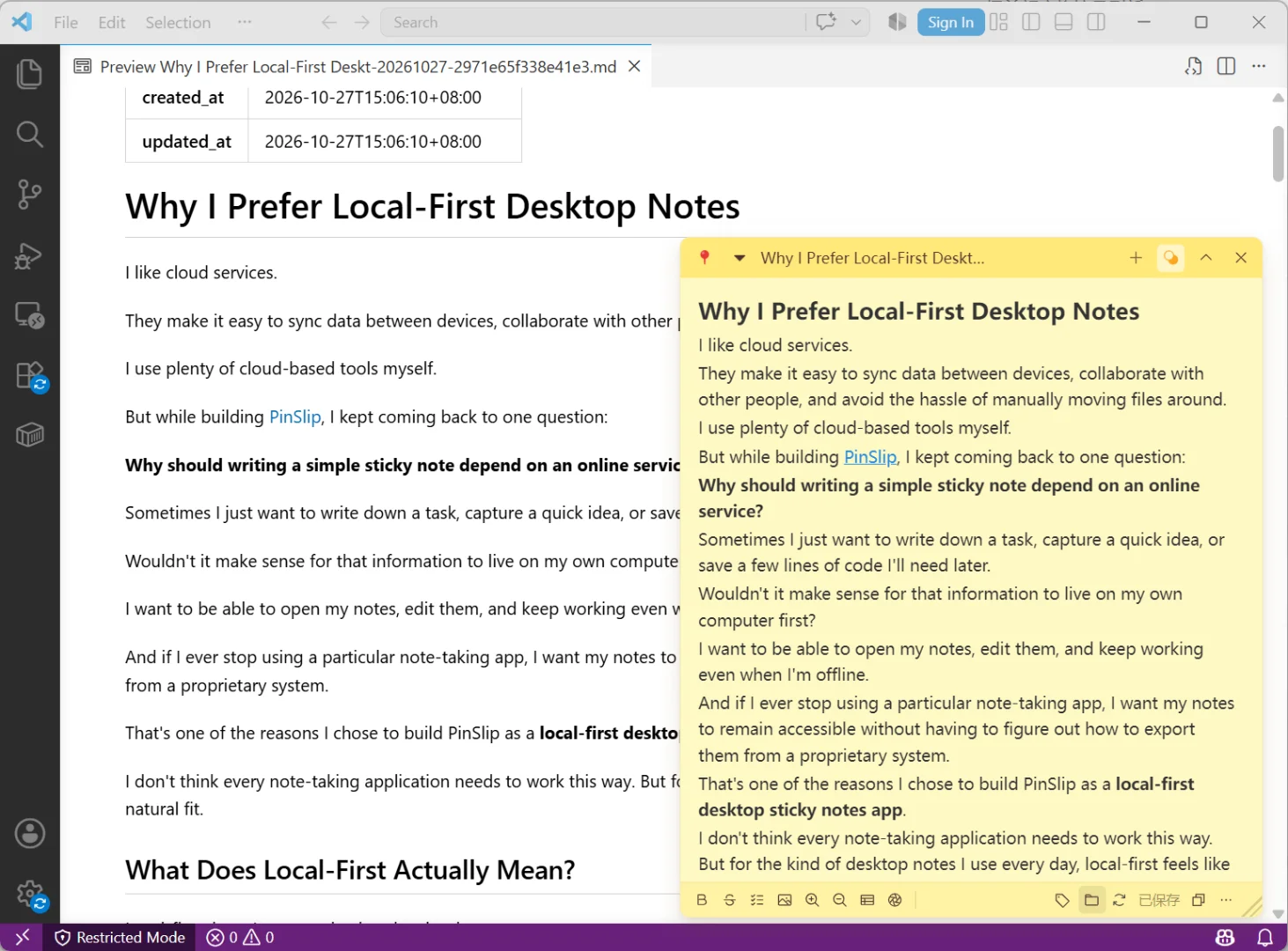
That's why PinSlip stores notes as .md files.
If I create a development checklist in PinSlip, I can also open the corresponding Markdown file in VS Code.
I don't even need to launch PinSlip to read it.
Why Markdown?
There are three things I particularly like about Markdown.
First, it's readable.
Markdown is fundamentally a text-based format.
Even without a specialized editor, you can still inspect the content using an ordinary text editor.
Second, it's structured without being complicated.
Headings, lists, checkboxes, quotes, and code blocks cover most of what I need in a desktop note.
Images and other attachments may require separate files, so moving or backing up notes also means keeping those related assets together.
But the main content remains easy to access.
Third, it isn't tied to one application.
VS Code, Obsidian, and many other tools can work with Markdown files.
If I ever stop maintaining PinSlip, people should still be able to read and edit the notes they created with it.
That's something I value about open file formats.
Your notes should outlive the app you used to create them.
To me, that matters more than having dozens of application-specific formatting features.
If you're interested in how Markdown works for everyday notes, I've also written about using Markdown sticky notes on your desktop.
4. Local-First Doesn't Mean Giving Up Sync
When I talk about local-first notes, there's an obvious question:
What happens when you want to use your notes on another computer?
It's a fair question.
I don't want my notes to be stuck on one device either.
Like many people, I sometimes move between different computers and operating systems.
But I believe sync should be a choice, not a requirement.
That's one of the reasons I added Git synchronization to PinSlip.
Why Git?
As a developer, I'm already familiar with Git.
It tracks changes to files and makes it possible to exchange those changes between computers through a remote repository.
Since PinSlip notes are already Markdown files, using Git to synchronize them felt like a natural option.
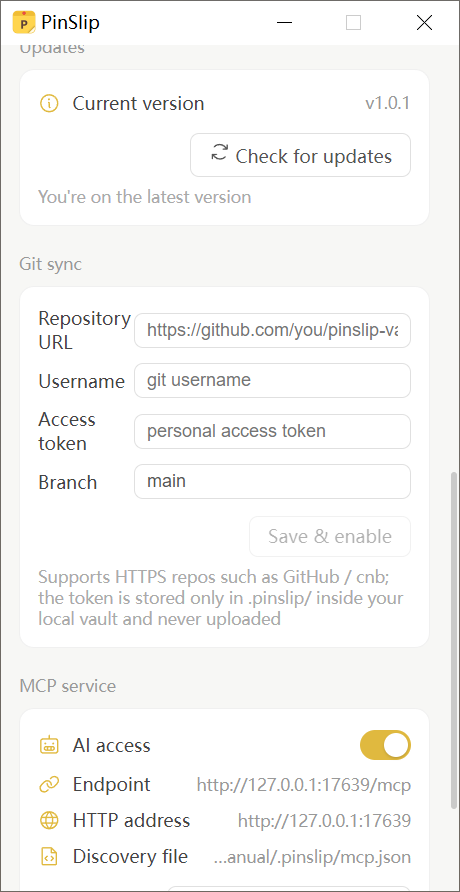
PinSlip lets you connect your notes to a Git repository you control, including private repositories hosted on GitHub, GitLab, or other compatible services.
Once configured, it supports automatic and manual synchronization.
It can commit, pull, and push changes, and attempt to merge changes made on different devices.
You don't need to install the Git command-line tool separately.
I like this approach because it gives users a choice about where their notes go.
They can use their own repository instead of depending on a dedicated PinSlip cloud storage service.
But there's an important trade-off.
Git synchronization isn't necessarily the best choice for everyone.
You need to configure a repository and authentication.
If you edit the same note on two computers, you may encounter a merge conflict that requires manual attention.
For someone who simply wants to sign in and have everything sync automatically, a conventional cloud note-taking service may offer a more convenient experience.
I don't believe Git sync is universally better than cloud sync.
I just wanted to provide an option for people who prefer managing their own data.
You can learn more about the setup in the PinSlip Git Sync Guide.
5. Local-First Notes Can Still Work with AI
More applications are adding AI features, and I think some of them can be genuinely useful for note-taking.
For example, an AI assistant could help you:
Find information across dozens of notes.
Summarize recently recorded tasks.
Turn a discussion into a new checklist.
Update an existing project note.
But that raises another question.
Do I need to move all my notes into a specific AI note-taking platform just to use those features?
I'd rather not.
With PinSlip, notes continue to live in local Markdown files.
Through its built-in MCP Server, users can choose to connect compatible AI assistants to those notes.
MCP stands for Model Context Protocol. It provides a way for AI applications to interact with external tools and data sources.
With PinSlip's MCP integration, a compatible AI assistant can use the available tools to search, read, create, and update notes.
For example, I might ask:
"Find all my notes about website SEO and summarize the unfinished tasks."
Or:
"Turn our discussion into a new task checklist."
The AI assistant can interact with the notes without requiring me to migrate the entire collection to a different note-taking platform.
Local-First Doesn't Automatically Mean Local AI
There's an important distinction here.
PinSlip's MCP Server is disabled by default. Users need to enable and configure it themselves.
PinSlip also doesn't include its own built-in language model.
It provides an interface that compatible AI clients can connect to.
If you use a cloud-based AI assistant, the content it accesses may be sent to that provider's servers.
The exact data handling depends on the AI client, model provider, and configuration you choose.
So local-first does not mean that every AI operation necessarily happens on your computer.
It means the core note-taking experience starts with local data, while you decide which additional integrations to use.
For me, having that choice matters.
6. The Trade-Offs of Local-First Notes
I've spent a lot of time explaining why I like local-first software.
But it wouldn't be fair to discuss the advantages without acknowledging the drawbacks.
Local-first isn't the right approach for every situation.
You Need to Think About Backups
If your notes exist only on your computer and the storage drive fails, those files can still be lost.
Local storage isn't the same thing as having a backup.
You can copy your notes to an external drive, NAS, or another storage service, but that requires some planning.
Git synchronization is useful, but it shouldn't automatically be treated as a complete backup strategy.
Multi-Device Sync Can Be More Complicated
Some cloud note-taking services let you sign in and immediately access your notes on another device.
A Git-based workflow like PinSlip's requires initial repository configuration.
And if conflicting changes occur, you may need to resolve them.
That additional control comes with additional responsibility.
Real-Time Collaboration Isn't Its Strength
If you need several people editing the same document simultaneously, tools like Google Docs or Notion may be a better fit.
PinSlip is designed primarily for personal desktop notes, not real-time collaborative document editing.
Local-First Doesn't Automatically Mean Secure
Saving files locally doesn't mean they're automatically encrypted or protected from every risk.
Malware, unauthorized access to your computer, or accidental file deletion can still affect local data.
If you synchronize notes to a Git hosting provider, repository permissions and access credentials also matter.
Local-first can give you more control over your data, but security still depends on implementation and how the software is used.
I think these limitations are worth being clear about.
I didn't choose local-first because I believe it's the best architecture for every application.
I chose it because it fits the problem I wanted to solve.
7. Why I Built PinSlip This Way
When I started working on PinSlip, I mainly wanted a desktop sticky notes app I would enjoy using every day.
I wanted something simple.
Open the app, create a note, write something down, and put it where I can see it.
No complicated setup.
No account required.
As PinSlip evolved, I added Markdown editing, tags, folders, Git synchronization, and AI integration.
But a few principles stayed the same.
First, notes should remain accessible as ordinary files.
Even if someone stops using PinSlip, they should still be able to read and edit their content.
Second, core note-taking shouldn't depend on an online service.
Without an internet connection, users should still be able to create, open, and edit notes.
Third, synchronization and AI should be optional extensions.
Need synchronization? Connect a Git repository.
Want AI assistance? Enable MCP and connect a compatible assistant.
Don't need either?
PinSlip can still be a simple desktop sticky notes app.
I like the idea that advanced features can be added when they're useful, rather than becoming requirements before someone can start writing.
Of course, that doesn't mean PinSlip perfectly implements every principle of local-first software.
It's still evolving, and I continue to improve it based on how people actually use it.
But when it comes to data storage and the core experience, this is the direction I want to keep.
Final Thoughts: Your Notes Should Belong to You
I don't think cloud software is bad.
Cloud synchronization, online collaboration, and hosted services solve real problems.
For some workflows, a cloud-based note-taking app is absolutely the right choice.
But for the desktop sticky notes I use every day, I prefer something different.
I want to open an app and start writing without needing an account or an internet connection.
I want to know where my files are stored.
I want to be able to back them up, move them, and open them using other tools.
And when I need synchronization or AI features, I want the option to enable them without making them essential to the basic note-taking experience.
That's why I prefer local-first desktop notes.
It's not about rejecting the cloud.
It's about enjoying the benefits of modern software while keeping meaningful control over my own data.
Your notes should outlive the app you used to create them.
That's one of the principles I want PinSlip to keep following.
Try PinSlip
If you like the idea of local-first desktop notes, you can give PinSlip a try.
It's a free, open-source sticky notes app for Windows, macOS, and Linux.
You can start writing without creating an account, use Markdown to organize your content, and keep your notes in local files you control.
If you need more, you can optionally enable private Git repository synchronization or connect compatible AI assistants through MCP.