
9. Settings
Click ⚙ in the top-right of the main window to open the settings drawer.
This chapter explains every PinSlip setting, in the order the panels appear.
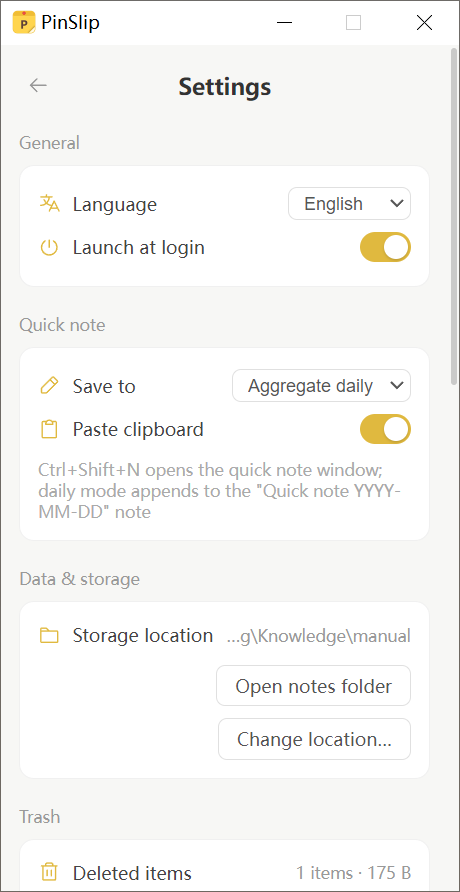
9.1 General
Interface Language
Supported:
简体中文 (zh-CN)
English (en)
日本語 (ja)
한국어 (ko)
Español (es)
Deutsch (de)
Français (fr)
Follow system
Switch anytime — takes effect immediately.
Launch at Login
PinSlip can launch automatically at login, open the main window, and restore your previously open tabs.
9.2 Data & Storage
Storage Location
Displays the current notes save path.
Open notes folder → opens the
notesdirectory at the save location in your system file manager.Change location → opens the system directory picker to pick a new save location.
Recycle Bin
Usage stats: count + total disk space.
Auto-cleanup after: 7 / 30 / 90 / Never days (default 30).
Open recycle bin: opens the
.trash/directory in your file manager.Empty recycle bin: confirmation required to prevent accidents.
Auto Update
Current version number.
Check for updates manually.
Download progress.
One-click restart and install once the download finishes.
Silent check 15 seconds after launch.
9.3 Git Sync
See previous content for full details. Fields listed here:
Field | Description |
|---|---|
Repository URL |
|
Username | Your Git username |
Token | Password field, never re-displayed, blank = no change |
Branch | Default |
Sync interval | 1–1440 minutes (default 10) |
Sync now | Manual trigger |
Edit configuration | Modify an existing config |
Disable | Turn off Git sync (keeps the |
Status Row
Last sync time
Pending pushes: n
Error message (if any)
9.4 Quick Capture
Field | Description |
|---|---|
Save target |
|
| |
Clipboard bring-in | Toggle (on by default) |
9.5 MCP Service
Field | Description |
|---|---|
Master switch | On by default |
MCP URL |
|
HTTP base URL |
|
mcp.json path |
|
Copy connection info | One-click copy of the mcpServers JSON to the clipboard |
9.6 Settings Default Quick Reference
Setting | Default |
|---|---|
Interface language | Follow system |
Launch at login | On for installer builds |
Recycle bin auto-cleanup | 30 days |
Git sync interval | 10 minutes |
Quick Capture save target |
|
Quick Capture clipboard bring-in | On |
MCP service | On |
Auto update | Silent check 15 seconds after launch |
Default note color | yellow |
Default note pin state | Pinned |
Default note font size | 100% |
Default note location | Vault root |